Showing posts with label browsers. Show all posts

UC Browser Offline Installer: Windows 10, 8, 7 Free Download


uc browser offline installer

Several browsers exist on the internet for downloading but one promising software which delivers its features is UC Browser for Windows 10, 8.1, 8 and 7 operating system. UC Browser is an application software developed by UCWeb, a company owned by Alibaba Group. This program ranks third on the list of most used browsers having a market share of about 7.9 percent according to Statcounter GlobalStats. It is an easy to use program with wonder features at your disposal. You can download UC Browser Offline Installer version for free from this web page.

Getting this app installed on your PC is simple to do. Once you have downloaded the UC Browser standalone installer setup, all you have to do is to run it. At start, there isn’t any complex task to perform. Its installs within some few seconds after you click on the install button.

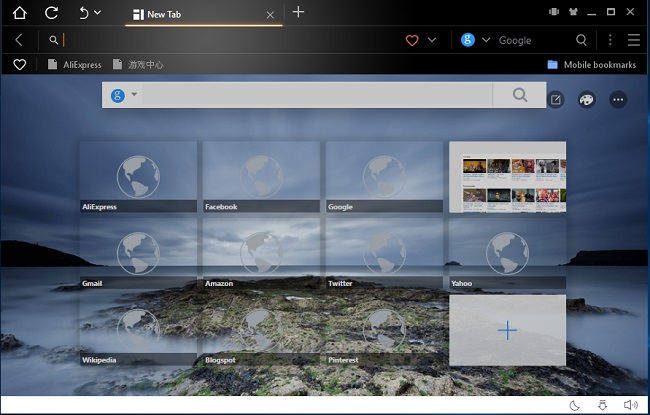
UC Browser for PC uses the webkit rendering engine and shares some similarities with the Google Chrome. Aside having some similarities in terms of features, it also has its own unique features which you won’t find in order web browsers. The user interface of the software is very catchy and appealing to the eye. Its gorgeous UI is customizable with themes and wallpapers (which can be downloaded from the software’s theme center).

The address bar is very wide to accommodate long URLs. It also uses a separate search bar to allow users perform web searches. But please bear in mind that the default search engine used is Google but you can switch any search engine from the settings page. Whenever you launch the browser, it displays a list of thumbnails of popular websites for easy access. This list can be increased by adding your own or decreases by deleting some websites.

The recent raise in the use of UC Browser is due its compression technology. This data compression used by the software renders and delivers web contents faster. Aside that there is a powerful download manager tool. The download manager uses multi thread connection technology to speed up downloads. It also supports simultaneous downloads, pausing and resuming of file downloading.

This web browser also makes streaming of videos simple and amazing. The software has a video pop out feature which allows you to open your video in another window and continue streaming. This feature allows you to watch videos even if you minimize the browser and work in a different program. Aside this feature, you can also download videos with the app for free. Once the video starts playing a download button appears to allow you to save the video onto your computer. Just download UC Browser Offline Installer for Windows for free.

The night mode feature allows you to reduce the brightness of the browser window to allow you read well when at night. It prevents you from straining and also protects your eyes. If you hate annoying ads, then using this app will save that headache. The ad-blocker feature lets you prevent annoying ads from displaying and it also speed up websites too. There is also a screenshot tool (accompanied by some editing tools) which you can use to take shots of websites you are viewing. The browser extensions feature also allows you to extend the functionality of the software. You can install and run both offline and online extensions for free. It uses extensions from Chrome web stores.

The security features of the software has been significantly improved. It is now more secured and prevents users from getting their PCs infested with malware when they go online. It prevents you from visiting malware infested websites and also prevents you from downloading malicious files from the internet.

This app comes with great features to make it an amazing program. It is easy to update and can also be used in different languages too. It requires less system resources to perform its work due its lightweight nature. Download UC Browser Offline Installer for Windows for free from this web page.

System Requirement

Operating System: Windows 10, 8.1, 8, 7
File Size: 42MB
Installer Type: Offline Installer
Supports Both 32 Bit and 64 Bit


Maxthon MX5 Browser Free Download For Windows 10, 8, 7


maxthon mx5 browser free download

Browsing the internet can be more fun and easy if the right web browser is used. There are a whole lot of browser software to download but there is one program which offers the best experience and premium features for free. Maxthon MX5 Browser is what I’m talking about. This software is developed by Maxthon a Chinese company. I won’t deny the fact that this application has had some issue concerning security but their latest version the MX5 Cloud Browser ships with all major fixes and delivers better user experience.

The program possess some qualities to makes it special and different from other applications. It has been efficiently built to be lightweight and also run smoothly. Even at the installation stage it takes only some few seconds to get installed on your PC after you have run the Maxthon browser offline installer. The latest version is backed by a dual core technology. It makes good use of hard acceleration and resource optimization. It also uses both Trident and Webkit rendering engine to display pages efficiently. Due to this feature both old web pages and current pages are displayed correctly on your screen.

The user interface of the software is quite catchy. The launch page displays a search bar and some popular websites and sites you visit the most. The launch pages also has a cool background feature which you can change with the available images that come with the browser. Maxthon does not limit you to those set of images but allows you to use your own images too. The left side of the window displays some useful buttons which allows you to view your bookmarks, RSS feed, notes you have previously made and also access the Maxthon’s help desk.

One thing you will notice when using software is how quick web pages are loaded. The web browser loads contents in a snap and also displays them correctly too. It has a verification system which checks websites and verifies whether they are safe for you browse on them. Great tools have embedded to makes it easy to use and fun to work with. The reader mode tool can be used to set the background of pages to dark to allow you read well during night times and also to protect your eyes. The ad-blocker tool is available to let you prevent ads from showing up on websites and also load contents faster.

Maxthon browser latest version also come with a resource sniffer tool which allows you to download online videos you are streaming for free. That Facebook or YouTube video you are watching can be downloaded easily onto your computer by using this tool. Thinking of taking a snapshot of an entire website or a portion of it but cannot find a way to do so. Try this software to complete that task in an easy way with the app’s snap tool.

The translator of the program uses Google Translate to translate a selected text or a website into a preferred language of your choice. Maxnote is a great tool which you can use to save website URL, write notes, save web contents and many more. Some passwords we create can be hard to remember especially when you have different passwords for different accounts. Passkeeper is here to make your life easier by allowing you to encrypt your passwords in a vault and used them when needed. Passkeeper only requires you to remember only one password and it handles all the hard work. What this feature does is to save your account credentials and automatically enters them when you want to login.

UUMail an advanced feature of Maxthon MX5 browser which keeps your web mail safe from spam. It protects your privacy and prevents spam mails from entering your mail box. It uses a shadow mail to protect your real email address and delivers only the right email to your mail box. A browser with cloud integration can be hard to find these days but Maxthon comes a cloud synchronization feature to backup your data and secure them too. Security features of the software is very reliable. It warns you when you want to visit untrusted websites. Checks your files after downloading for any malware and blocks them if any is found.

Maxthon MX5 browser for Windows is a powerful and simple software with premium feature available for free. It is a lightweight program, updates regularly and very fast as well. Download it for free from this web page.

System Requirement

Operating System: Windows 10, 8.1, 8, 7, Vista, XP
File Size: 55MB
Installer Type: Offline Installer
Supports Both 32 Bit and 64 Bit

Yandex Browser Offline Installer: Windows 10, 8 & 7 Free Download

yandex browser offline installer

When listing browsers without including Yandex web browser then you might be committing a mistake. Yandex browser is an application software developed by search engine gaints Yandex. The software was initially released in 2012 and is used by millions of users worldwide. This program comes bundled with great features. It has been streamlined to perform better and faster than its competitors. The best part is it compatible with Windows 10, 8.1, 8 and 7 operating systems. You can download Yandex browser offline installer for free below.

Installing this software on your PC is very easy to accomplish. If fact it takes only a few seconds to complete the process. Once it done you can launch it to start surfing the internet. One thing you will notice about Yandex is how speedy the application is. The latest version of the program has been efficiently built to consume only few of your system resource to perform its task.

The user interface of the software is simply amazing. It has been well built, easy to use and navigating around to really cool. The default live background used is pleasing to the eye and you can even change the background by using any of the images from the background gallery. On top of the window you will find the search or address bar. This bar allows you perform all your web searches and also enter website address. The software’s bookmark button can also be found at the far right of the search or address bar.

Yandex browser for Windows start page also makes it easy for you to access your favorite websites without typing much. Tableau host a list of websites you visit most. This list can the increased by adding your own addresses or decreased by deleting web address you want. The start page also gives you access to recently closed tabs, downloads, extensions and synced devices.

Yandex browser for Windows loads website in a fast pace when compared with others. It quickly loads web pages and at same time displays them correctly on any desktop screen size. In cases when you are experiencing bad internet connection you can enable the turbo mode feature of the application. The turbo mode feature used by the software is powered by Opera browser’s turbo mode technology. It speeds up the loading of websites when experiencing network interruptions.

Yandex browser offline installer version also comes with a personalized news feed feature called Zen Feed. Zen Feed analyses your interest and serves you the right articles, news and other contents. Tab browsing is also supported by the application. You can surf the internet in any number of tabs and the software won’t slow you down. Signing in to the browser allows you to sync your data with different devices. Syncing allows you to access your bookmarks, password, opened tabs and other data from different devices with Yandex installed on it.

Extensions exist to increase the functionality of the browser. You can install both offline and online extensions and use them within the application. Customizing the appearance of the application software is also possible with the backgrounds gallery. You are free to use any background you want. In situations when battery is running out, animated backgrounds are stopped to save some energy to browse for longer period.

Security features of the software is of the highest level. Yandex browser standalone installer for Windows comes with improved and high level security features to protect your privacy and guard your PC. Its protect active security scans files you download and websites you visit for viruses and other malicious contents. It also prevents you from visiting fraudulent websites and keeps your online identity safe. It also has the ability to safeguard all your password and credit card information. When connected to open public Wi-Fi too, Yandex keeps you safe by encrypting your connection to websites you browse online.

Getting this browser installed on your PC is a great investment to make. This software keeps you the maximum browsing experience. It updates regularly and can run in several languages. It is now lightweight and very easy to use as well. Download and install Yandex browser offline installer for Windows 10, 8.1, 8 and 7 for free by clicking on the download link.

System Requirement

Operating System: Windows 10, 8.1, 8 & 7
File Size: 63MB
Installer Type: Offline Installer
Supports Both 32 Bit and 64 Bit


Download Torch Browser Offline Installer: Windows 10, 8, 7 Versions

torch browser offline installer download

Torch Browser for Windows 10, 8.1, 8 and 7 is a web application software which allows PC users to browse internet on their desktop. It first appeared on the market around 2012 and has been adopted by most users. Torch Media is the company behind the development of this unique browser. The browser is based on the Chromium Open Source but it also has some unique and rich features which you won’t find in most browsers. You can download the Torch Browser Offline Installer version for free from this web page.

Getting this software installed on your PC is no big deal. Once you have downloaded the Torch browser standalone installer from this web page, all you have to do is to double click the setup to install it. The installation process takes only some few seconds to complete. One thing I did not like is the number of shortcuts the program created after installing. Aside that, everything works very well.

Torch Browser Review and Free Download For Windows  


As I mentioned earlier Torch browser for Windows is based on the Chromium Open Source. As a result, it has a similar user interface like Google Chrome but goes a set further to include some unique feature to the browser. One thing a like about the software is how quick it starts whenever you launch it. Besides that, it is also lightweight due its minimal use of system resources like RAM and CPU.

The user interface of software is straightforward and very simple as well. It has a neat address bar with the bookmark button located at the far right within the bar. The address bar combines with the search bar, you can use it to perform all your web search and also enter websites addresses. Right beside the address or search bar, you will find some useful buttons aligned next to each other. This buttons give you access to use some of the rich features of the browser.

Within the body of the Torch browser window, you will see an auto generated thumbnails of pages. These thumbnails are created by Torch based on websites you visit the most. It allows you to access your favorite websites with just a single click. One cool feature of the browser is how fast it opens web pages when browsing. The program has been efficiently built to open websites as quickly as possible and it also does a perfect job by displaying web contents correctly on any PC screen.

Torch Torrent


I don’t know if you’ve come across any web browser which has an inbuilt BitTorrent client. If not then you have one at your disposal. This software comes with own torrent application which allows user to download torrent files directly from the software. It does not require any additional software to be installed before working. This feature of Torch allows you to search for torrent files like movies, videos, music, programs and many more. You can also add your own torrent file or use a magnet link to add torrents direct from the interface. How about streaming torrent videos before they complete. This browser makes it possible for you to watch videos you are downloading via torrent before they complete. Playing partially completed videos is also a reality with this browser.

Torch Player


Who needs a media player when this software comes with a cool and functional media player. Torch browser for Windows has its own player which allows you to play all your media files with ease. It can play most media formats like MKV, MP4, MP3, MPG, FLV, WEBM and many more. It also includes some cool themes to makes stream amazing. To use the player, all you have to do is to drag and drop the file you want to play onto the browser. Just download the Torch Browser Offline Installer setup for Windows and enjoy these amazing features.

Torch Music


Torch Music is a music portal service which allows you to stream music online for free. This service uses YouTube to play music directly from the browser. You can choose to play full album or simple search and play songs you love. You are also permitted to create your own playlist or simply let the software perform that task on your behalf by clicking on the Wiz Button. There are inbuilt controls which allows you pause, play or control volume even when you navigate to other tabs.

Download Accelerator


Torch browser standalone version for Windows also comes with a download accelerator technology. This feature of the software allows you to download files faster than most browsers. It downloads your file by dividing it into several parts and downloads them simultaneously using multiple connection. After the download has completed, it joins all the parts into one file without causing any damage.

Media Grabber


The media grabber tool found within this software is also amazing. It lets you save videos or audios you are streaming online onto your PC. It works on most major streaming websites like YouTube, Facebook, Dailymotion and many more.

Torch Facelit and Share


Facelit allows you to redesign the looks of your Facebook account. It allows you to change the appearance of your Facebook with backgrounds, colors, fonts and themes. You can also get creative by making your theme and apply it.  Torch Share is another cool feature which allows to share pages, and images with friend on Facebook and Twitter.

Online Games


Online gaming feature of the software lets you play games online without downloading them. Once you connected to the internet you can play any game you want without registering or signing in. You can try out the online puzzle games, racing, cards, arcade games and so much more.

When it comes to online safety Torch browser excels. It blocks you from opening websites which have malware and pages with prove to be phishing. It prevents you from downloading harmful contents on your PC and ensures you are browsing on safe websites. Torch also allows you to migrate bookmarks from other browsers too. You can also access your data like passwords, history, bookmarks and many more from different devices when you have signed-in into your account. You can also customize the browser with themes, apps and extensions from chrome stores.

This web browser is a safe and secure software to use. It has been improved to work better and efficiently. It can run in several languages like English, French, Spanish, German and many more. Just download and install the Torch Browser Offline Installer for Windows 10, 8.1, 8 and 7 for free by clicking on the download link below

System Requirement

Operating System: Windows 10, 8.1, 8, 7
File Size: 67MB
Installer Type: Offline Installer
Supports Both 32 Bit and 64 Bit


Download Opera Offline Installer For Windows (32Bit / 64Bit)

download opera offline installer for pc

Opera browser for PC is a web browser software developed by Opera Software for Windows operating systems. This web browser is one of the most secure, fast and stable browser software for PCs. This browser has been around for more than 20 years and remains as one of the oldest web browsers. As at today, the browser still has millions of users globally and according to StatsCounter Opera has a market share of about 4 percent. You can download the Opera offline installer setup for free from this web page.

The latest version of the browser has been improved to provide smooth browsing experience for its users which is why I would recommend this software to any user. It now works efficiently by consuming less of your system resources like RAM and CPU. It also uses the Blink Engine which implements all the current web standards.

Getting the browser installed on your PC is very easy to do. Once you have downloaded the Opera standalone installer setup, all you have to do is to double click the exe file to install the program. The installation process completes in about a minute or two depending on your PC. During the process you will be asked to make the browser your default browser which I guess you will do.

The first thing you will notice about the browser is how fast it starts when you launch it. It responds quickly and is more secure. Opera offline installer for PC has a pleasing user interface design. To me Opera has the best default design interface among most major browsers. It is richer in features and very easy to use. It opens websites in a snap and displays them correctly on any device.

This web browser is now bigger and better than the previous versions. The address bar of the browser now combines which the search bar. So now you can either enter web URLs or perform web searches directly from the address bar (however you can separate the two in the settings window). The default search engine used over here is Google although you can change it to preferred search engine in the setting window. The browser now lets you type less when you try to visit previously visited web pages. Immediately you start to type the website address Opera automatically pulls down a list of your web history which has the URL. The same goes for web searches with a list of suggested keywords.

At the far left side of the body of the start-page you will find the sidebar. The sidebar has a list of tools to make navigating and browsing more easily. Opera standalone installer version for Windows makes it easy for you to access your web history, bookmarks, personal news and speed dial from the sidebar. The sidebar now includes Whatsapp web app which allows you connect to account and chat directly from the browser. Facebook Messenger can also be found in the sidebar which allows users to login to their account and have a chat with their friend and families. The snapshot tool which is included in the sidebar allows you to take snapshot of webpage.

The start page of the browser has a search bar to allow you to perform all your searches. Below it is the speed dial section. The speed dial contains a thumbnail of your favorite websites. This makes it easy for you to open websites without spending time to enter them in the address bar. You can easily add websites to this section and as well as move sites to the trash can. You can also rearrange them by simply dragging and dropping to any position you want.

Opera offline installer for PC has been made to understand how to browse and how frequent you browse on some website. It has included a suggestion below the speed dial to list a thumbnail of websites you visit frequently for quickly opening.

Tab browsing

Tab browsing has been a core component of Opera standalone installer and latest version of the browser even adds more features to it. Using tabs allows you to open several web pages without opening different windows. The tabs are rectangular in shape. Closing the last tab does not exist the whole browser, a feature which is not present in browsers like Chrome and Firefox. Right clicking on any tab gives some options and command like pinning tab, muting tab, cloning tab, opening and closing tabs and last but not the least saving tabs to speed dial. Previous versions had a tab preview which when you hover any tab displays a preview the web page but version has it disabled. It can be enabled again by going to the settings, then navigate to browser, move to the user interface section and click on show tabs preview.

Personal News Feed

The personal news feature of the browser serves you with the latest headlines on the internet. The browser pulls headlines from tops websites within your selected country. You can edit the type of content you want to see. You can be served contents related to business, arts, science, technology, lifestyle, gaming, food and many more. In addition, you can dictate which websites to receive news from.

Ad-blocker and Turbo Mode

Opera standalone installer for Windows comes with an ad-blocker feature. This feature does not require any additional software to be install before working. It allows you to block annoying ads which webmasters display on their websites. It also saves data bundle and also loads page faster. Turbo mode has been with Opera for many years. When in use, it loads websites faster even when you are having a slow internet connect. The only problem with this version is, turbo mode comes disabled but you can enable it by clicking on the settings button, then click on browser and scroll down and click on the checkbox to enable this feature.

Bookmarking and Syncing

Opera browser for PC allows you to bookmark pages you like and would love to visit again. The bookmark button can be found in the address bar using a love shape as its icon. Besides using the button, you are also permitted to use the keyboard shortcut CRTL + D to save bookmarks. Syncing allows you access your data on different devices with Opera installed on it. Once you have signed in you can access your bookmarks, history, tabs and other data from a different device.

Snapshot and PDF Reader

Opera offline installer for Windows comes with a snapshot tool which can accessed from the sidebar panel. The snapshot tool allows you to take shots of some aspect of the browser. Once you click on the capture button you can edit your image with ease. There is a blur tool which you can use to blur some portions of your image. There is also an arrow tool which you can use to draw arrows in nine different colors. The pencil tool can also be used to write some text to images. Including your photo to the image can be done by using the selfie tool. The selfie tool uses your webcam to allow you take photos. The inbuilt PDF reader allows you to open and read your PDF documents easily.

Opera Free VPN and Video Pop Out

Video pop out feature of the browser is an awesome feature which can’t be found in most web browsers. This feature allows you to open a video you are streaming in a separate rectangular window which is easy to resize. To use this feature, all you have to do is to move your mouse over the video, a button will appear and just click on it. Video pop out lets you watch your online videos whilst working in a different desktop application. Opera Free VPN provides more security when you go online. This feature ships with the browser and doesn’t require any additional software.

It encrypts your internet connection to the browser and prevent hackers from tracking you. Once enabled, you will be able to connect to fast and secured servers around the world. It is usually recommended to use a VPN software when connected to unsecured networks like public Wi-Fi. And with the Opera Free VPN can enjoy premium VPN services and secure your connection.

How to enable Opera Free VPN

This feature comes disabled but enabled in private browsing window. But do not worry, you can also use it in normal browsing mode. Bear in mind that, the VPN service only works when turbo mode is disabled.

➤First click on the Opera button, which can be found at the top left corner of the windows.
➤Then navigate to settings and click on it or simply use the keyboard shortcut ALT + P.
➤Click on privacy and browser in the settings window.
➤Scroll down until you see VPN
➤Now click on the checkbox to enable it.

Once you have enabled it, it will appear at the far left within the address bar. When you click on it you can perform the following functions like turning it off and on and changing the location.

Battery Mode and Password Manager

Opera offline installer for PC comes with a battery mode feature which allows you save more energy and browser longer. The battery mode feature prevents the browser for draining your battery. Password manager also allows you to save your passwords and automatically signs you in when you want to access your online account.

Extensions and themes

Extensions and themes let you customize the browser the way you want. You can download and install extension right into the browser. Extensions allows you to use some aspect of desktop applications in the browser. Opera browser for PC even goes a step further to allow you run Chrome extensions and apps in your browser. You can use themes to change the appearance of the browser. Themes allows user to enhance the looks of the browser and makes it pleasing to the eye.

Security

Security features of the browser has been greatly improved. Opera browser latest version has been equipped to quickly detect and block you from visiting malicious websites. It also ensures you are downloading safe files onto your PC by scanning your downloads for hidden threats. Opera really cares about your privacy and has included a private browsing window which allows you to browse safely and does not record your data like history, bookmarks, and cookies. However the browser cannot prevent your internet service provider from knowing which websites you visit.

This browser was made solely for you with the right features to give you a smooth browsing experience. The browser is now lightweight, can run in different languages and updates automatically to the latest version. It is free, versatile and very fast as well. Download Opera offline installer setup for Windows below by clicking on the download link.

System Requirement

Operating System: Windows 10, 8.1, 8, 7
RAM: 512MB
Disk Space: 400MB
File Size: 38MB
Supports Both 32 Bit and 64 Bit
Installer Type: Offline Installer

Mozilla Firefox Offline Installer For Windows (32 Bit / 64 Bit)

Mozilla Firefox offline installer download for windows 10, 8, 7

Mozilla Firefox is a web browser software developed by Mozilla Corporation for Windows operating systems. Firefox is a free and open browser which can be downloaded and used for free on any PC. It first appeared on the market around 2004 and took over the crown of being the most popular and widely used browser. Some way along the line, it lost its crown to Google Chrome. Firefox has a market share of about 5.72 percent according to StatCounter. You can download Mozilla Firefox Offline Installer version for Windows 10, 8.1, 8, and 7 for free from this webpage below.

Firefox has been well optimized to perform better and faster than most major browsers on the market. Making this software your default web browser is the best thing to. The latest version which is Mozilla Firefox Quantum provide more security features, now more stable and performs better by using less of your system resources like RAM and CPU. This web browser is powered by Gecko engine which implements the latest web standards to display web contents.

Getting the browser installed on your PC is very easy to do. Once you have downloaded the Mozilla Firefox Standalone Installer for Windows 10, 8.1, 8, and 7, all you have to do is to double click the setup to start the installation. Even at the installation process Firefox gives you control. You can choose the standard installation and let the browser install most common options on your behalf. Choosing a custom install allows you to install or ignore optional components like maintenance service, creating desktop icons and choosing your preferred directory to install the program. Installing it too takes only some few seconds to complete.

Mozilla Firefox browser for PC uses a minimalist design interface which is the first thing you will notice after you have launch the browser. Did you even notice how quickly the browser starts after launching it. This feature is due to the impressive improvement the developers made to the browser. At the top left corner of the browser windows you will find the navigation buttons which allows you to move back and forth when browsing on a website. There is also a home button and a refresh button too. Right beside it you find the address bar combined with the search bar. Within this bar you can perform all your web searches and also enter website addresses you want to visit. The search engine used is Google but you can change it in settings section. Mozilla Firefox offline installer version for Windows 10, 8.1, 8 and 7 also allows you separate the search bar from the address bar which can be done in the settings.

Moving to the right side of the address/search bar you will find a list of buttons aligned to each other. The first button is the library button which gives you access to your web history, books, downloads, sync tabs, view pocket list and take screenshots. The sidebars button also opens a side bar at the left side of the browser window by default and displays your history, bookmarks and sync tabs.  The other button which is the most important is the menu button which gives to access to many aspects of Mozilla Firefox browser for PC. It still uses the hamburger icon like the previous versions.

The body of Firefox start page gives you control and an easy way of browsing. First there is a search bar which allows you to perform all web searches you want. The default search engine used the bar is Google but you can change it any search engine of your choice. Below it is the top sites section which contains a list websites. You can edit the list to add more websites to the top sites section. You can also manage the list with lots of ease. You can delete, pin sites and open pages in new windows or a private window.

The highlight section also displays a list of your bookmarks, articles, videos and other pages you have recently visited. Mozilla Firefox standalone installer version for Windows also allows you to customize the start page. Clicking on the setting button located at the right corner of the start page lets you customize the page the way you want. You can choose to disable the search bar, top sites, highlight section and the snippets from Mozilla.

Loading web pages in Mozilla Firefox browser for PC is very quick. It loads contents faster than most web browsers and also does its best to display them correctly. This improved version of the browser allows you to enjoy a smooth browsing experience with a smoother scrolling and responsive tab switching.

Mozilla Firefox latest version also comes with a reader mode feature which displays web contents in an appropriate way to make it easy to read web contents. The best part is, it is ad-free. The reader mode comes with a whole lot of tools at your disposal. You can change the fonts of text to either san-serif or serif, increase or decrease font size, adjust the width of contents and change the background of the page.

There is also a read out tool which reads out text in reader mode. Firefox provides controls for you to adjust the speed, skip to the next text or change the default voice. Bookmarking web pages can be done easily with the bookmark button location in the address bar or you simply use CRTL + D to bookmark. You can use the pocket button to save videos, pages and articles to your pocket account and view them on any device with Firefox.

Mozilla Firefox offline installer for Windows supports tab browsing. You can open any number of tabs to browse and the browser won’t slow you down dues to its efficient memory handling. Switching across tabs has now been improved and smoother. Using the keyboard shortcuts CRTL + TAB (you first have to enable this feature in the settings) you can navigate to other tabs like the way you do in Windows by pressing ALT + TAB. Mozilla Firefox latest version for Windows also provides useful and helpful tools to web developers to work and build websites faster. Signing in to your account allows you sync your data like history, passwords and tabs on other devices with Mozilla installed on it

The options section of the browser allows you to customize the browser the way you want. Within this section you can change how your start page should look like, change tab preferences, change language and appearance, change location for downloaded files, check for updates and change network proxy settings. Navigating to the search section also allows you add and change the default search engine used by the browser and also separate the search bar from the address bar. Privacy and security section gives you control over how the browser should protect you. You can add a master password to encrypt the password vault in-built within the browser. This password vault keeps your login credentials safely and automatically logs you in when you want to sign in to your accounts. You can also change the default tracking settings used by the browser and also clean web data like site data and cached web contents.

Mozilla Firefox browser for PC provide better security than most browsers when going private. Private mode does not save your history, temporary files, searches and cookies. However the browser cannot prevent your Internet Service Provider or network administration from knowing websites you visit. The latest version of Mozilla Firefox browser comes with a tracking protection which prevents website from collect information about your browsing sessions. When trying to visit a malware infested website Firefox quickly blocks you and warns about the website you are trying to visit. It keeps you safe from phishing and malware infested websites and most importantly scans your downloads for any hidden malware.

You can also customize and change the appearance of the web browser with the available themes. Add-ons are also available to extend the functionality of the browser. There are thousands of add-ons ranging from ad-blockers to password managers to themes and many more.

Making Mozilla your number browser comes with great advantages. The browser is now stable, fast and highly secure. It can run it in several languages, now lightweight and updates automatically to latest releases. Just download and install the Mozilla Firefox Offline Installer setup for Windows 10, 8.1, 8 and 7 for free by clicking on the download button.

System Requirement

Operating System: Windows 10, 8.1, 8, 7
File Size: 34MB for 32 Bit and 37MB for 64 Bit
Disk Space Required: 150MB or more
Installer Type: Offline Installer
Supports Both 32 Bit and 64 Bit
Note: the download link takes you to Mozilla’s download center where you can download the software in any language of your choice. They are all offline installers and the latest versions too.


Google Chrome Offline Installer For Windows Free Download

google chrome offline installer download

Google Chrome web browser is one of major browsers you can find. In fact it is the most used browser and is very popular too. The browser is developed by search engine giants Google. Chrome first appeared in 2008 after all efforts to build a powerful, fast and stable web browser were successful and implemented. Google chrome is the choice of most users because of the great powerful it possess.
According to StatCounter, this web browser is the most used and has a market share of about 55 percent globally. You can download the Google Chrome Offline Installer Setup from this page for free.

Google Chrome Download For Windows 10, 8.1, 8 And 7

One question most PC user usually ask is, why I should use Chrome. Getting this web browser installed on your PC is a great thing to do. Chrome is powered by giant tech company providing many services for free like this browser. The application software was built to run faster, easy to use and to give you the ultimate control over the way you surf the internet. In term of performance chrome rates highly, security – it also scores highly and speed – it is awesome.

Getting the program installed on your computer is very easy to do. Once you have downloaded the Google Chrome Standalone Installer for Windows 10, 8.1, 8 and 7 from this website, all you have left is to run the installer by just double clicking. This package is an offline version which doesn’t require you to have internet connection before installing. Installation process takes only some few seconds to complete. Once it is done, you can open it and start browsing.

Google Chrome web browser isn’t any ordinary browser but a feature-rich and powerful program. It has been intelligently built to give users a smooth browsing experience. It runs using less of your system resources to do its job.

Chrome browser has a simple and elegant user interface thanks to its minimalist design. A simple outlook but yet powerful to beat other browsers. Once you launch the browser, it will take you straight to the start page. You will see Google’ logo and underneath it is the combined search bar and address bar where you can type your search keywords and web addresses. Moving up too, you will find the Ominibox. The Ominibox combines both the address bar and the search bar. The default search engine used by Ominibox is Google Search engine. Immediately you start typing in the box list of suggestions drops down in case you performing a web search or recently visited websites if you are trying to visit a website.

Google Chrome standalone installer for Windows supports multi-tab browsing. You can open any number of websites in different tabs and chrome won’t slow you down. Managing tabs is also quite simple to do. Right clicking on a tab gives you a whole of commands you can apply to the current tab and other tabs as well. You are given options like closing tabs, reloading the current tab and other tabs, pinning a tab, adding tabs to bookmarks, muting and so much more. One problem with the tabs feature is, closing the last tab exits the entire browser.

Bookmarking a website in Google Chrome is easy to do. When you want to bookmark a website you can use the bookmark button located at the far right-side of the ominibox or you can simply use the shortcut keys to perform this action CTRL + d. Chrome offers a better and new way of managing bookmarks. The bookmark manager (CTRL + SHIFT + O) allows you view all your bookmarks and also perform certain actions like editing, copying URL of saved bookmark and deleting. Getting to the settings section of the browser isn’t difficult to do. Just click on the vertically aligned three dotted button and then click on settings.

Google Chrome browser runs on Google’s V8 engine which loads JavaScript faster. It quickly downloads scripts faster and runs them smoothly. The browser is also powered by WebKit rendering engine which loads websites faster to users. It quickly download web resources like html, CSS and media files quickly. The best part is it displays websites accurately on any device. The software’s download manager tool also downloads files faster. A built-in reader to help you read all your PDF documents in great style.

Signing in into the browser gives you a lot of control over your data. The program allows you to sign in using your Gmail account. Signing in allows sync your bookmarks, passwords, web history, opened tabs and other data. You can easily access these data on different devices by logging in.
Google Chrome latest version for Windows also has a password manager tool that saves your passwords whenever you login to online accounts. It quickly remembers your saved password and automatically logins you in whenever you want to. The browser also comes with an inbuilt player that allows you to stream online videos without downloading any additional software. It can play HTML5 videos and audio with ease. It also has an inbuilt flash player which allows you to load flash contents but it has been disabled by default by the browser.

Customizing and adjusting browser settings the browser can also done easily. The setting section provides several ways of adjusting the default settings to suit your needs. You can easily change the font used by the browser, change the program language, change download location, change default search engine used by the browser and many more.

Themes and apps are also available to make your web browser look better. The Chrome store provide a large collection of themes which you can download and change the appearance of your browser. Apps support also extends the function of the program from being a powerful browser to running apps. You can download apps from the Chrome web store and run them either offline or online. Extensions are also supported by the browser. It allows web apps and desktop applications to install extensions.

Chrome offline installer excels when it comes to web security. The software has a strong defensive system when it comes to protecting users online. It has been equipped with anti-phishing and anti-malware tools block you from visiting unsafe websites. When you try to visit webpages which has malicious contents Chrome quickly warns and prevents you from visiting such pages. It can also identify phishing websites with ease. This software ensures you are browsing on safe and trusted websites.

Going private is another useful feature of Google Chrome offline installer. This feature of the web browser also allows you browse securely. It does not save your history, passwords, cookies, site data and information entered in web forms. But also cannot prevent your Internet Service Provider and network administrator from monitoring your activities.

Using this web browser on your PC will be beneficial to you. It comes with great features, runs smoothly and automatically updates itself to the latest version. It is lightweight, easy to setup and very easy to use as well. Download Google Chrome Offline Installer for Window 10, 8.1, 8 and 7 for free.

System Requirement

Operating System: Windows 10, 8.1, 8, 7
Disk Space Require: 500MB or Higher
Installer Type: Offline Installer
File Size: 50MB
Supports Both 64 Bit